
.jpeg)
Google has released a critical security update for the Chrome browser addressing 33 vulnerabilities, including multiple high-risk memory corruption flaws that can enable remote code execution (RCE).
Several vulnerabilities require only user interaction with a malicious webpage, significantly increasing exploitation risk. Due to their severity, technical details have been partially withheld until patch adoption improves.
Threat Type: Remote Code Execution (RCE), Memory Corruption
Attack Vector: Web-based (malicious or compromised websites)
User Interaction: Minimal (e.g., visiting a webpage)
Impact Scope: Arbitrary code execution, Data exfiltration, Sandbox escape through exploit chains, and Full system compromise (in chained attacks)
Possible Exploitation Scenario
A typical attack chain may involve:
- Victim visits a malicious or compromised website
- Browser processes crafted content triggering a UAF or overflow
- Memory corruption enables controlled code execution
- Additional vulnerabilities are chained for sandbox escape
- Attacker gains persistence or system-level access
Technical Details
The most critical issues involve use-after-free (UAF) vulnerabilities:
- Occur when memory is accessed after it has been freed
- Enable attackers to manipulate memory and hijack execution flow
Critical Vulnerabilities (RCE Risk)
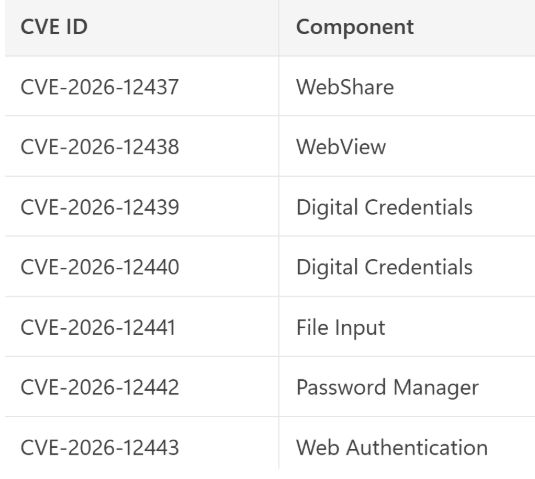
These components interact with sensitive browser features, increasing exploit reliability.
Additional Issues
WebRTC
- Heap buffer overflows (CVE-2026-12447, CVE-2026-12466)
- Out-of-bounds reads (CVE-2026-12461)
Extensions
- Input validation flaws
- Multiple UAF bugs (CVE-2026-12445, CVE-2026-12467)
Safe Browsing
- Race condition vulnerability (CVE-2026-12454)
GPU
- Uninitialized memory usage (CVE-2026-12469)
File System Access
- Insufficient policy enforcement (CVE-2026-12460)
Media / Browser Core
- Multiple UAF and logic issues
Mitigations
- Update Chrome immediately
- Navigate: Settings → About Chrome
Ensure version:
Windows/macOS: 149.0.7827.155/.156
Linux: 149.0.7827.155
- Restart browser after update
- Audit endpoints for outdated Chrome versions
- Enforce automatic updates via policy
- Monitor logs for: Unusual browser crashes, Suspicious WebRTC/network activity
- Implement: Endpoint Detection & Response (EDR), Browser isolation technologies, Extension whitelisting policies
- Look for Crashes tied to: WebRTC, Web Authentication APIs, and File uploads / password handling
Indicators:
- Abnormal browser subprocess behavior
- Suspicious network traffic from Chrome processes



.jpeg)

.png)


.png)
.png)