

Updated Versions:
- Windows/Mac: 149.0.7827.196 / 149.0.7827.197
- Linux: 149.0.7827.196
Google has released a critical security update for the Chrome browser, addressing 18 security vulnerabilities, including four Critical and fourteen High-severity flaws that could potentially allow threat actors to execute arbitrary code on affected systems.
The most severe vulnerabilities patched in this release affect Chrome's memory management mechanisms, particularly within the WebGL rendering engine, where multiple Use-After-Free (UAF) vulnerabilities were identified.
Use-After-Free vulnerabilities occur when software continues to access memory that has already been released, creating opportunities for attackers to manipulate memory contents, hijack program execution, and potentially achieve remote code execution (RCE).
While Google has not disclosed evidence of active exploitation, the concentration of critical memory corruption flaws across several browser components significantly increases the risk of weaponization by threat actors.
Critical Vulnerabilities
- CVE-2026-13028
Component: WebGL
Vulnerability Type: Use-After-Free, This flaw affects Chrome's WebGL rendering engine and could potentially enable arbitrary code execution through crafted web content.
- CVE-2026-13032
Component: WebGL
Vulnerability Type: Use-After-Free, This vulnerability impacts memory handling within the WebGL subsystem.
- CVE-2026-13033
Component: Blink InterestGroups
Vulnerability Type: Out-of-Bounds Read, An Out-of-Bounds Read vulnerability that may expose sensitive memory contents or contribute to browser exploitation chains.
- CVE-2026-13038Component: Autofill Vulnerability Type: Use-After-Free, A memory corruption vulnerability affecting Chrome's Autofill functionality that could potentially be leveraged for code execution.
High-Severity Vulnerabilities
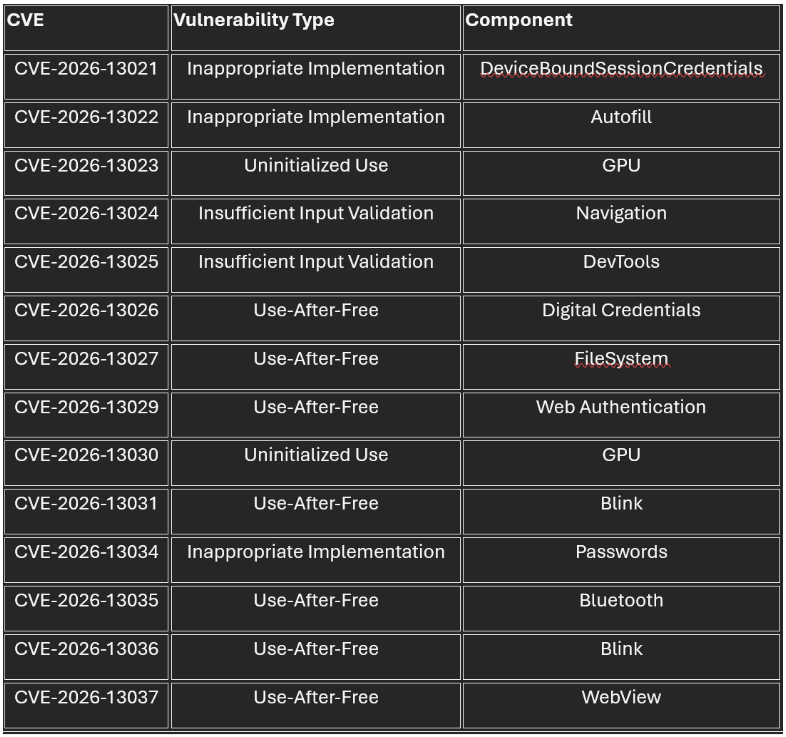
Historically, memory corruption vulnerabilities in modern browsers have been favored by advanced threat actors and exploit developers due to their potential to bypass browser security boundaries and facilitate remote code execution.
The presence of multiple exploitable flaws within rendering and authentication-related components presents an attractive attack surface for phishing campaigns, malicious websites, watering-hole attacks, and exploit kit operators.
Google has restricted technical details for the vulnerabilities until a majority of users have received the update, reducing the likelihood of immediate weaponization while patch adoption progresses.
MITIGATIONS
Security teams should:
- Monitor endpoint telemetry for abnormal Chrome child processes.
- Review browser crash logs for unusual WebGL, Blink, or Autofill-related exceptions.
- Investigate unexpected browser-based execution chains originating from untrusted websites.
- Ensure browser version compliance across enterprise environments.
- Prioritize patch deployment for internet-facing workstations and privileged user accounts.
- Organizations and individual users should update Chrome immediately to the latest stable release.
Manual Update Steps for Individuals
- Open Google Chrome
- Navigate to Settings
- Select Help
- Click About Google Chrome
- Allow Chrome to download and install the latest update
- Restart the browser when prompted


.jpeg)
.jpeg)

.png)


.png)
.png)