

What appears to be a helpful AI coding assistant in Microsoft Visual Studio Code may actually be watching everything we do.
A malicious campaign has been discovered in the official VS Code Marketplace, where legitimate AI-powered extensions are secretly collecting developers source code and files. With more than 1.5 million installs, these extensions exploited the trust developers place in popular tools, turning routine coding activity into a quiet and widespread data leak.
What’s Happening
These extensions pretend to be helpful AI coding assistants, offering features like code completion, explanations, and productivity boosts. But behind the facade, they’re silently spying on developers, grabbing every file the moment it is opened even if no changes are made.
After installation, the extensions quietly connect to attacker controlled servers and start exfiltrating workspace data, all without alerts, prompts or any obvious signs to the user.
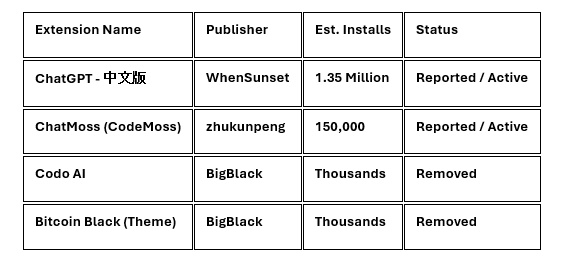
Identified Malicious Extensions
The following extensions have been identified as the primary carriers of the spyware.
Technical Analysis
This isn’t a simple malware grabbing a token and moving on. These extensions behave more like silent spyware, watching everything you do inside VS Code and sending it out in multiple ways:
1. Real-time file surveillance:
The moment you open or edit a file, the extension takes a copy of the entire file. It doesn’t wait for you to save changes. The contents are encoded and quietly sent to a remote server controlled by the attacker.
2. On-demand data extraction:
Hidden inside the extension is a backdoor that listens for commands from outside. When triggered, it can bundle and upload dozens of files from your workspace without alerts, pop-ups or user approval.
3. Profiling and fingerprinting:
Behind the scenes, the extensions load invisible tracking components using hidden iframes. These run commercial analytics tools to build a detailed profile of the developer (device details, activity patterns, and usage behaviour) helping attackers identify high-value targets.
Targeted Data
The primary goal of this campaign is the theft of Intellectual Property (IP) and Secrets directly from developers’ systems, including:
- Source Code: Full proprietary codebases are uploaded to external servers.
- Environment Variables: .env files containing database passwords and API keys.
- Credentials: SSH keys, AWS/Google Cloud tokens, and browser cookies.
- System Metadata: Wi-Fi passwords, clipboard data, and screenshots of the developer's desktop (seen in the "Evelyn Stealer" variant).
Remediation Steps
· Immediately review installed VSCode extensions and remove any AI tools from unknown or unverified publishers.
· Assume exposure if affected extensions were installed and rotate credentials found in development projects.
· Monitor outbound traffic from developer systems for suspicious destinations.
· Restrict extension usage via policy or allow lists in enterprise environments.
· Test new extensions in isolated environments before widespread deployment.
Prevention & Best Practices
To reduce the risk of malicious extensions and protect your development environment:
- Stick to verified publishers: Choose extensions marked with the blue Verified Publisher badge in the VS Code Marketplace whenever possible.
- Use extension allowlists: Organizations should enforce a trusted-extension policy by allowing only approved extensions through VS Code allow list and untrusted workspace settings.
- Watch outbound traffic: Monitor for unusually large, Base64-encoded data leaving developer machines, especially traffic going to unfamiliar or unexpected regions.
- Limit workspace permissions: Open untrusted projects in Restricted Mode to prevent extensions from automatically running code or accessing sensitive files.




.png)


.png)
.png)