
SolarWinds has rolled out urgent security updates after uncovering four security flaws in its Web Help Desk(WHD) software.
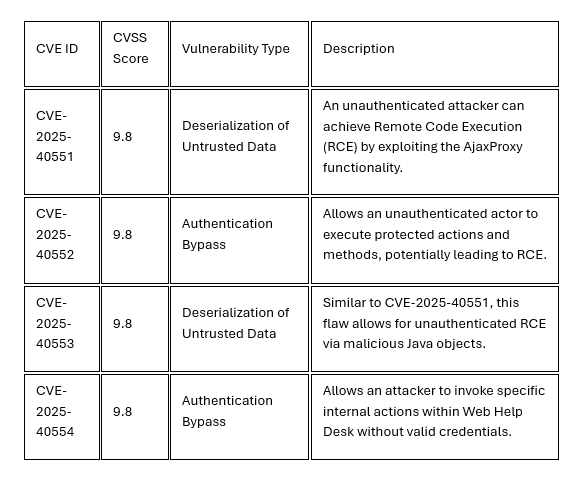
Tracked as CVE-2025-40551, CVE-2025-40552,CVE-2025-40553, and CVE-2025-40554, these weaknesses stem from insecure data handling and gaps in authentication controls. If successfully exploited, an unauthenticated remote attacker could execute arbitrary code with SYSTEM privileges on the host machine, leading to complete compromise of the affected server.
Vulnerability Details
Affected Versions
- SolarWinds Web Help Desk versions prior to 2026.1
Technical Impact
An attacker exploiting these vulnerabilities could
- Execute Arbitrary OS Commands: Run any command on the underlying server.
- Privilege Escalation: Gain full administrative rights (SYSTEM context).
- Data Breach: Access, modify, or delete sensitive help desk tickets, user data, and asset management information.
- Persistence: Create new administrative accounts or install backdoors to maintain access.
The deserialization flaws (CVE-2025-40551 andCVE-2025-40553) are particularly dangerous because they are "highly reliable" vectors that do not require any user interaction or valid login credentials.
Recommendation
- Apply the WHD 2026.1 update from SolarWinds as soon as possible. This release patches all known critical vulnerabilities.
- Prioritize patching for internet-facing and externally accessible instances of Web Help Desk.
- Verify that all servers are updated and that no legacy or outdated versions remain in your environment.
Best Practices
- Restrict Access: Ensure the Web Help Desk instance is not exposed directly to the public internet unless necessary. Use a VPN or IP whitelisting to restrict access to internal staff.
- Network Segmentation: Place the WHD server in a segmented network zone (DMZ) to prevent lateral movement in the event of a compromise.
- Principle of Least Privilege: Ensure the service is running with the minimum required privileges. Review user permissions related to WHD operations.
- Vulnerability Scanning: Run authenticated scans to confirm that legacy or forgotten instances of WHD are identified and patched.
- Review user permissions related to WHD operations.

.jpeg)
.jpeg)

.png)


.png)
.png)