
A newly identified Java-based Remote Access Trojan (RAT) known as QuimaRAT has emerged within underground cybercriminal communities as a Malware-as-a-Service (MaaS) offering. Unlike conventional RATs that are typically developed for a single operating system, QuimaRAT has been engineered to operate natively across Windows, Linux and macOS, significantly expanding its operational reach and increasing the potential attack surface for enterprise environments.
Threat Overview
QuimaRAT is a sophisticated Java-based Remote Access Trojan (RAT) designed to operate across Windows, Linux, and macOS from a single codebase. By leveraging Java Native Access (JNA), the malware can interact directly with native operating system functions, eliminating the need for separate malware variants for each platform.
Unlike traditional RATs, QuimaRAT is marketed as a Malware-as-a-Service (MaaS) offering on underground cybercrime forums. It is sold through a subscription model that includes a malware builder, payload generator, web-based management console, and regular updates, making advanced malware capabilities accessible to a broader range of threat actors.
More than just a remote access tool, QuimaRAT is a complete attack framework comprising multiple integrated components that support malware delivery, payload deployment, persistence, command-and-control (C2) communications, and a wide range of post-compromise activities. Its modular architecture allows attackers to dynamically load additional capabilities as needed, making it a flexible and evolving threat to enterprise environments.
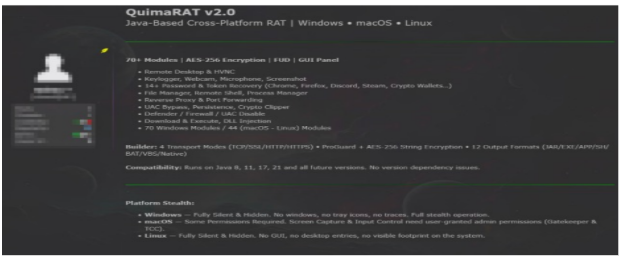
QuimaRAT Ecosystem
The malware ecosystem consists of four primary components that work together throughout the attack lifecycle:
Quima (RAT) | Primary remote access malware used after compromise.
Quima Builder | Generates payloads for multiple operating systems and delivery methods.
Quima Loader | Retrieves and executes the primary payload using browser cache techniques.
Quima Dropper | Creates HTML and SVG phishing pages used to deliver the malware.
The builder supports multiple payload formats including executable files, Java archives (JAR), batch scripts, shell scripts, Visual Basic scripts, HTA applications, Microsoft Office macro documents, JavaScript, LNK shortcuts, and CPL files, providing attackers with significant flexibility during phishing campaigns.
Attack Methodology(TTPs)
- Initial Access: Threat actors use phishing emails, fake software updates, malicious websites, or fake CAPTCHA pages to trick users into downloading and running the malware.
- Payload Delivery: Once the malicious loader is executed, it retrieves the main QuimaRAT payload, often from the browser cache, helping it avoid detection by traditional security tools.
- Persistence: The malware establishes persistence on the compromised device to ensure it automatically runs after system reboots.
- Command-and-Control (C2): QuimaRAT connects to an encrypted command-and-control (C2) server, allowing attackers to remotely manage the infected system.
- Modular Deployment: Instead of deploying all features at once, QuimaRAT downloads additional plugins and modules only when needed, enabling attackers to customize the attack while minimizing the malware's initial footprint.
- Post-Compromise Activities: Attackers can perform actions such as remote command execution, credential theft, file management, system reconnaissance, and deploying additional malware based on their objectives.
Technical Capabilities
QuimaRAT provides attackers with extensive post-compromise capabilities, including:
- Remote command execution
- File upload and download
- Credential theft
- Clipboard monitoring
- Process execution
- Dynamic plugin deployment
- Remote payload execution
- Shellcode execution
- Webcam access (where permissions allow)
- System information collection
- Configuration updates
- Automatic malware updates
- Persistent remote access
Persistence Mechanism
QuimaRAT employs operating system-specific persistence mechanisms to survive system reboots:
In Windows
- Registry Run Keys
- Scheduled Tasks
- Startup Folder entries
In Linux
- Cron jobs
- Autostart desktop entries
In macOS
- LaunchAgent property list (plist) files
Défense Evasion Mechanisms
QuimaRAT uses several techniques to avoid detection and remain active on infected systems:
- Hides important code and text to make analysis more difficult.
- Obfuscates its code to prevent easy detection by security tools.
- Uses encrypted plugins to hide additional malicious features.
- Stores its payload in the browser cache to reduce the chance of being detected.
- Runs only one copy of itself to avoid raising suspicion.
- Checks for virtual machines and sandbox environments to evade security researchers and automated analysis.
- Updates its Command-and-Control (C2) server information if the original server becomes unavailable.
- Uses a watchdog process to automatically restart or recover if the malware is stopped.


Potential Business Impact
If successfully deployed within an enterprise environment, QuimaRAT may enable attackers to:
- Establish persistent unauthorized access.
- Steal user credentials and sensitive corporate information.
- Conduct internal reconnaissance and lateral movement.
- Deploy additional malware, including ransomware or information stealers.
- Exfiltrate confidential business data.
- Maintain long-term access while evading traditional signature-based detection.
Recommendations
To reduce the risk of QuimaRAT and similar malware, organizations should:
- Train employees to recognize and avoid phishing emails, fake software updates, and malicious websites.
- Keep operating systems, Java, and applications up to date with the latest security patches.
- Deploy and regularly monitor EDR/antivirus solutions to detect suspicious activity on endpoints.
- Monitor for unusual network connections and remote access activity, especially communications to unknown external servers.
- Restrict or disable unnecessary Java applications and only allow trusted software to run within the environment.
- Regularly review systems for suspicious startup programs, scheduled tasks, and unauthorized changes to detect malware persistence early.

.jpeg)
.jpeg)
.jpeg)

.png)


.png)
.png)