
Manic Android malware turns nearby devices into a data pipeline
Security researchers have uncovered a new Android malware family called Manic that can steal sensitive information from an infected phone and, when that phone has no internet connection, pass the stolen data through nearby infected devices until it reaches one with internet access.
Manic combines banking fraud, spyware and remote-control capabilities. It has been observed targeting financial institutions. Researchers identified 169 targeted Android applications.
What is Manic?
Manic is a form of Android malware that combines several capabilities normally seen in different types of threats.
It can:
- Steal banking credentials and passwords.
- Capture PINs and one-time codes.
- Read SMS messages and notifications.
- Collect files, contacts and location information.
- Take screenshots and monitor the screen.
- Interact with the device remotely.
- Target banking, payment, cryptocurrency, government/eID, messaging and authentication applications.
- Transfer stolen information through nearby infected devices when direct internet access is unavailable.
The malware has been active since at least February 2026, with newer versions continuing to develop.
The trick that makes Manic stand out
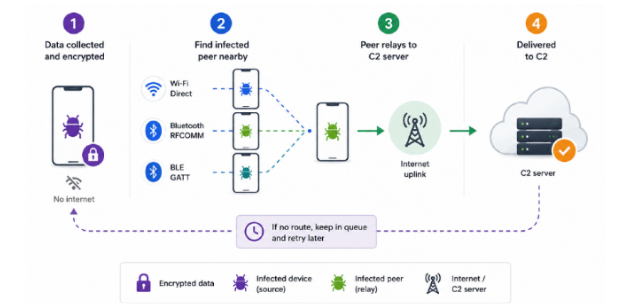
Most malware steals information and sends it directly to an attacker's server but Manic has another option. Suppose Phone A is infected and contains stolen banking information, but it has no internet connection. If another infected phone, Phone B is nearby and has internet access, Manic can use Phone B as a relay.
The malware can use Wi-Fi Direct, Bluetooth and Bluetooth Low Energy (BLE) to communicate between nearby devices. Researchers also observed support for multiple relay hops, meaning the stolen information can potentially move through several infected devices before reaching an internet-connected device.
What is Manic looking for?
Manic monitors 169 application package IDs, covering a wide range of services. Researchers found targets including:
- Banking applications
- Payment services
- Cryptocurrency wallets and exchanges
- Government and electronic identity applications
- Messaging applications
- Authentication and 2FA apps
- Browsers and email applications
It can see what you type
One of Manic's more concerning features is its abuse of Android Accessibility Services. Researchers found that it can use the service as a form of keylogger. A keylogger is software that records what a user types but Manic goes further by classifying what it captures. It can distinguish between things such as:
- Device PINs
- Passwords
- SMS codes
- Recovery phrases
- Email logins
- Ordinary text
The Victim may not see anything suspicious
Manic can place a transparent layer over a legitimate numeric keypad and capture the victim's touches while passing those interactions to the real application. The banking application continues to work, the user enters their PIN, and the transaction may look completely normal. Meanwhile, the malware has recorded what was entered.
Manic can also intercept notifications and SMS messages, monitor the screen, collect files and location data, and give attackers remote access through WebRTC sessions.
How does Manic get onto a phone?
Researchers have not established one definitive infection route, but the campaign has involved phishing websites and malicious applications disguised as legitimate utilities.
This is an important warning for Android users. A malicious application does not necessarily look malicious. It may present itself as a useful tool and then request permissions that give it extensive control over the device. Once those permissions are granted, the malware can begin collecting information and maintaining access.
Recommendations
- Be careful with APK files: Avoid installing applications from unknown websites, links in unsolicited messages or unofficial sources unless you can verify where the application came from.
- Treat accessibility permissions seriously: Do not grant Accessibility Services to an application unless there is a clear reason for it.
- Review notification access: Be cautious when an application asks to read notifications, particularly if it has no legitimate reason to do so. Notifications can contain OTPs, password-reset links and other sensitive information.
- Keep Android Updated: Install security updates and application updates promptly. Updated devices are better positioned to defend against known threats.
- Monitor Financial Accounts: Enable transaction notifications and regularly check bank and payment accounts for activity you do not recognize.
- If you suspect infection, act quickly: Disconnect the device from other personal and corporate accounts, contact your financial institution if banking information may have been exposed, and have the device professionally assessed or reset as appropriate.
Conclusion
An infected phone can potentially use another infected phone as a bridge, passing stolen information from device to device until it reaches an internet-connected system. Be selective about what you install, keep your device updated, and treat Accessibility and notification access as sensitive privileges.
Follow esentry for emerging threat intelligence, malware research and practical cybersecurity advisories that help individuals and organizations understand threats before they become incidents.


.jpeg)


.png)


.png)
.png)