
Over the past six months, cybercriminals have escalated their phishing campaigns against Facebook users by adopting the Browser-in-the-Browser (BitB) technique, a sophisticated phishing method that significantly raises the success rate of credential theft. BitB has now become a favored method for credential theft, targeting Facebook’s massive user base of over three billion accounts.
These campaigns represent a clear evolution from traditional phishing, combining trusted cloud infrastructure abuse, URL shorteners, and high-fidelity fake authentication flows to bypass both user suspicion and security controls.
What Is Changing in Facebook Phishing Campaigns?
Historically, Facebook phishing relied on crude fake login pages hosted on suspicious domains. Current campaigns show a marked shift in both tradecraft maturity and delivery infrastructure.
Key developments include:
· Adoption of Browser-in-Browser (BitB) fake login windows
· Hosting phishing content on legitimate cloud platforms (e.g.,Netlify, Vercel)
· Use of URL shorteners and fake Meta CAPTCHA pages
· Highly contextual lures aligned with real Meta enforcement workflows
The Browser-in-Browser (BitB) Technique
The BitB technique was first demonstrated by security researcher mr.d0x in 2022 and has since been operationalized by cybercriminal groups.
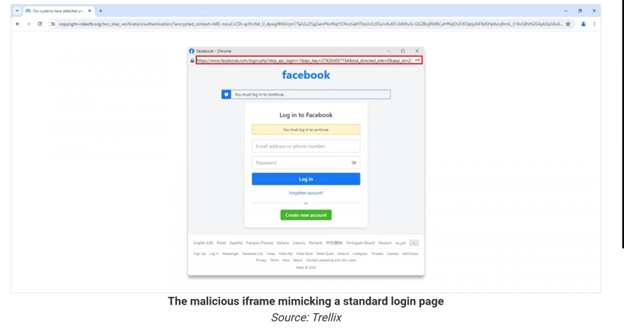
In a BitB attack:
· Victims are lured to an attacker-controlled webpage
· A fake browser pop-up appears, implemented via an iframe
· The iframe visually mimics a legitimate Facebook login window, including Platform branding, Window title, A convincing (but fake)URL string
· Because the pop-up exists inside the browser, visual cues users normally rely on are ineffective
From a user perspective, the experience is indistinguishable from a legitimate federated login flow.
Campaign Observed
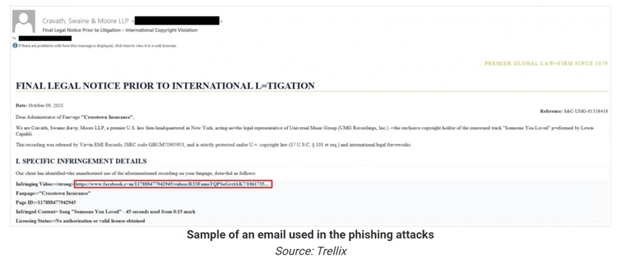
Facebook-focused BitB campaigns use lures designed to induce urgency and authority, including:
· Law firm impersonation
· Claims of copyright or intellectual property infringement
· Threats of imminent account suspension
· Fake Meta security alerts
· Alleged unauthorized login attempts
· Requests for “account verification” or “appeals”
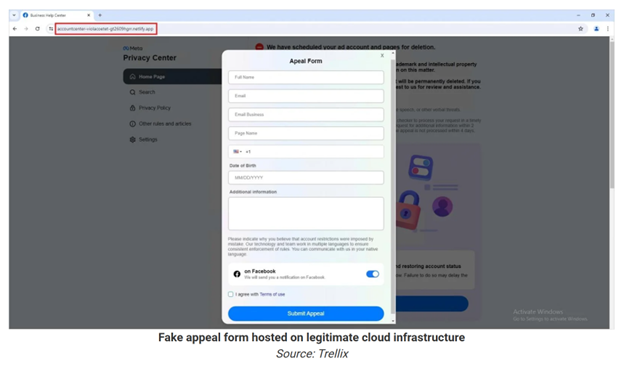
· Meta Privacy Center impersonation
· Fake appeal forms collecting credentials and personal data
Notably, many phishing pages are hosted on trusted cloud platforms, which helps them:
· Bypass reputation-based email and web filters
· Appear legitimate to end users
· Persist longer before takedown
For Users
· Treat all account-related alerts with skepticism
· Manually navigate to the official Facebook URL in a new tab instead of clicking embedded links
· Be cautious of login pop-ups:
· Legitimate browser windows can be moved outside the main browser
· BitB iframes are locked within the webpage and cannot be detached
· Enable two-factor authentication (2FA) on Facebook and linked accounts
For Security Teams
· Monitor for phishing pages hosted on legitimate cloud platforms
· Increase awareness training around fake pop-ups and embedded login windows
· Flag shortened URLs in security-themed emails for additional scrutiny
· Track repeated Facebook account abuse as a potential indicator of upstream credential compromise

.jpeg)
.jpeg)
.jpeg)

.png)


.png)
.png)