
.jpeg)
A sophisticated banking malware operation known as KREMLIN is targeting users with a particularly stealthy approach. Instead of simply stealing passwords, it secretly installs a malicious browser extension inside Google Chrome and Microsoft Edge and uses it to collect credentials, cookies, session information and other sensitive browser data.
Security researchers tracked the operation across seven campaigns spanning roughly 15 months. The malware has evolved from earlier banking malware campaigns into a toolkit capable of silently modifying Chromium browser profiles and bypassing the browser's own integrity checks to make the malicious extension appear legitimate to the browser.
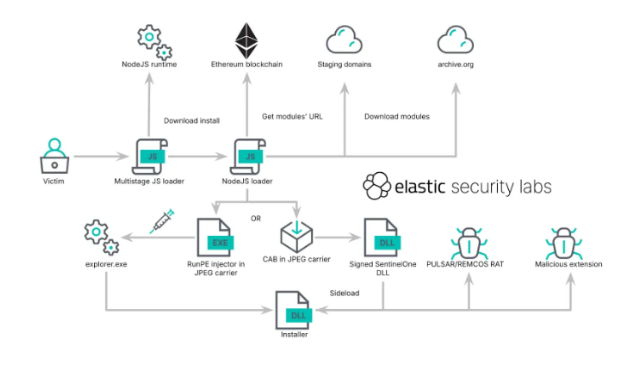
How KREMLIN Gets In
KREMLIN is not delivered through a single method. Several infection chains across the campaigns were observed, including malicious JavaScript, PowerShell, fake software, QR-code lures and other deceptive files.
The initial stage can display a fake error message, making the victim believe that something simply failed to open. Behind that error, however, the malware may continue working in the background.
It can enter the computer, check whether it is being analysed, download additional components, install the malicious browser extension, collect browser data and send the stolen information to the attackers. This multi-stage approach gives attackers more control over the infection and makes the initial malicious file less obvious.
How KREMLIN Tricks The Browser
Chrome and Edge use cryptographic integrity checks to detect unauthorised changes to important browser settings. If something changes a protected browser setting, the browser can detect that the seal no longer matches.
KREMLIN goes further than simply changing the setting. It obtains the information needed to recreate the integrity values, allowing the modified browser profile to pass the browser's own checks.
What Does The Malicious Extension Steal?
Once installed, the extension can access a wide range of information inside the browser. Researchers found capabilities for collecting:
- Cookies
- Session information
- Local and session storage
- Browser history
- Open tabs
- Screenshots
- Web page content
- Browser requests
- Saved login information
- Other browser profile data
The extension can also intercept selected web requests and receive instructions from the attackers about what information to target.
Why Session Tokens Are So Valuable
A password is not the only thing that proves you are logged into a website. After you successfully authenticate, websites often give your browser a session token or cookie that tells the service: This user has already been authenticated.
If attackers steal a valid session token, they may be able to use that authenticated session without having to know the victim's password. That is particularly dangerous for banking and other financial services.
Recommendations
- Monitor browser extensions: Track new, modified and unapproved Chrome and Edge extensions across endpoints.
- Control extension installation: Allow only approved extensions and alert on any unexpected installation or change.
- Monitor browser files: Watch for unusual changes to Chrome and Edge profile files, especially Secure Preferences.
- Monitor suspicious activity: Look for PowerShell, JavaScript or unknown programs running before browser changes.
- Monitor network traffic: Check for unusual browser connections, suspicious domains and unexpected WebSocket traffic.
- Watch for session theft: Monitor unusual access to browser cookies, sessions and stored browser data.
- Strengthen account protection: Use phishing-resistant MFA for privileged, financial and other sensitive accounts.
- Respond quickly to suspected compromise: Isolate the affected endpoint, revoke active sessions and credentials, and investigate whether browser data was stolen.
These measures are most effective when backed by continuous visibility and timely response. Our team can help monitor your environment, detect suspicious activity, investigate threats, and respond before they become larger incidents.
esentry continues to monitor emerging banking malware, browser threats and credential-theft campaigns to help organisations understand how attackers are targeting the systems people trust every day.


.jpeg)

.png)


.png)
.png)