
.jpeg)
A malicious Firefox extension disguised as a PDF identity verification tool has been discovered targeting Google accounts.
The extension, identified as pdf-para-texto@extensao[.]local, was presented as a utility that helps users verify their identity before opening protected PDF documents. But researchers found that the extension can download additional instructions after installation, capture Google session information and automate parts of an account takeover.
The campaign appears to have targeted Portuguese- and Spanish-speaking users, with the malicious functionality introduced in version 1.4 on September 11, 2026.
From PDF Tool to Account Hijacker
At first glance, there is nothing unusual about a browser extension helping users open or verify PDF documents. Once installed, however, the extension contacts an attacker-controlled website using a domain designed to resemble Google's legitimate infrastructure: pdf[.]gusercontent[.]com.
The extension then receives configuration and additional JavaScript that activates its malicious functionality.mResearchers found that the extension can subsequently interact with genuine accounts.google.com pages and inject an account-takeover script into the victim's browser session.
This means the attack does not necessarily need to create a convincing fake Google login page. It can operate on Google's real login page from inside the compromised browser.
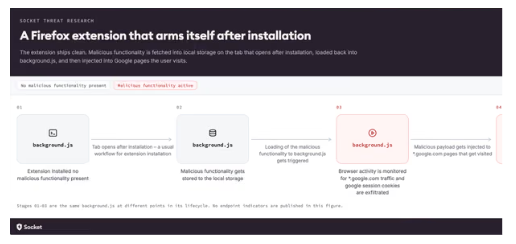
What happens after installation?
- User installs the extension: The victim believes they are installing a PDF or identity-verification utility.
- Extension contacts the attacker's infrastructure: A few seconds after installation, it opens the lookalike pdf[.]gusercontent[.]com domain.
- Malicious instructions are downloaded: The extension receives configuration and a second-stage payload.
- The browser visits Google: The extension waits for the victim to access accounts.google.com.
- The malicious script is injected: The downloaded payload is executed within the genuine Google page.
- Account information is collected: The malware attempts to capture authentication-related information and send it back to the attacker.
The attacker doesn't just steal a password
One of the most serious elements of this campaign is its focus on Google session cookies. If an attacker obtains a valid session token or cookie, they may be able to use that existing authenticated session without needing to know the victim's password.
Researchers found that the extension monitors Google traffic for authentication-related cookies and can send captured information to the attacker's infrastructure.
It can also manipulate the login process
The malicious payload does more than collect session information. Researchers found that it can display a fake “Validating your identity…” screen while manipulating the genuine Google authentication process underneath.
If Google requires a password reset during the process, the malware can reportedly generate and submit a new password controlled by the attacker. That creates another potential route to account takeover: the attacker can end up with both a stolen authenticated session and a password that they selected.
The extension was also observed interacting with Google's passkey/security-key authentication flow. This does not mean that Google's passkeys have been broken. Rather, the malicious extension is abusing the victim's already-authenticated browser and manipulating what happens around the legitimate authentication process.
Why this matters beyond Firefox
Browser extensions have access to some of the most valuable information on a user's computer. Depending on their permissions, extensions can interact with:
- Websites and web pages
- Browser traffic
- Cookies
- Stored browser information
- Authentication sessions
- Files and documents
A compromised extension can effectively sit inside the user's browser, where the user already has access to email, cloud storage, social media, financial platforms and corporate applications. For organisations, one malicious extension could therefore turn a normal employee browser into a pathway to corporate accounts and data.
Recommendations
- Monitor browser extensions: Track newly installed, modified, or suspicious Chrome/Firefox extensions across endpoints.
- Control extension installation: Allow only approved extensions and alert on unauthorized or unusual installations.
- Monitor authentication changes: Detect changes to passkeys, security keys, recovery details, and other authentication methods.
- Monitor account activity: Identify unusual logins, connected applications, and suspicious account activity.
- Monitor web and DNS traffic: Detect connections to known malicious domains and suspicious infrastructure such as pdf[.]gusercontent[.]com.
- Investigate affected endpoints: Treat compromised browser profiles as potential security incidents and investigate related files, processes, and network activity.
- Respond to account compromise: Revoke active sessions, reset credentials, review authentication settings, and investigate further unauthorized access.
These controls require continuous visibility across endpoints, identities, and network activity. Our monitoring, threat intelligence, detection, and incident response services help organizations identify suspicious activity and respond before it escalates.
esentry continues to monitor emerging browser, identity and account-takeover threats to help organisations understand how seemingly legitimate software can become an entry point for compromise.


.jpeg)

.png)


.png)
.png)