
.jpeg)
Your IT team says your passkey needs an update. You follow the instructions. Your account is now in someone else's hands. That is the basic idea behind a growing Microsoft 365 attack campaign uncovered by Microsoft.
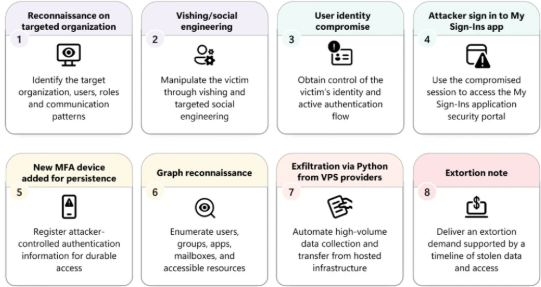
Attackers are impersonating IT help-desk staff and contacting employees by phone or SMS with an urgent message: your passkey, MFA or single sign-on (SSO) needs to be updated.
The victim is then directed to a fake Microsoft sign-in page. The page looks legitimate. The request sounds reasonable.
But the real goal is not to help the employee update their authentication: It is to get the attacker into the employee's Microsoft cloud account.
Microsoft has observed this activity since May 2026, with compromised accounts subsequently used to access SharePoint, OneDrive and email, search for sensitive information and exfiltrate data.
How Does a Fake Passkey Update Work?
The attack starts with identity-focused social engineering.
An attacker may call or message an employee's personal phone number while pretending to be from the company's IT department.
The story is simple:
“Your passkey needs to be updated.” Or “Your MFA configuration is about to expire.”
The victim is then sent a link to a website designed to look like a legitimate Microsoft authentication page.
From there, attackers can use adversary-in-the-middle (AitM) techniques or device-code phishing to obtain access.
In some cases, the victim does not even have to provide their password. They may simply be tricked into completing an authentication request that effectively grants the attacker access to the account.
The Dangerous Part Comes After the Login
Getting into the account is only the beginning.
Once access is obtained, attackers can add their own authentication method to the compromised account.
That could be a phone number, authenticator application or software-based OTP method.
Now the attacker has something much more valuable than a stolen password:
A way to keep getting back in.
Even if the employee is no longer involved, the attacker-controlled authentication method can allow continued access while valid credentials or sessions remain active.
What Are Attackers Looking For?
Once inside the Microsoft 365 environment, attackers can use the compromised identity to quietly explore the organization's cloud environment.
Microsoft observed activity including:
- Enumerating users, groups and permissions
- Identifying high-value accounts and resources
- Searching mailboxes and attachments
- Accessing SharePoint and OneDrive
- Downloading large volumes of files
- Collecting email data
- Maintaining access for hours or days
- Exfiltrating data from compromised cloud services
The attackers have also been observed using Microsoft Graph API to interact with cloud resources.
The problem? A single Graph API request may look completely normal.
The suspicious behaviour appears when many legitimate actions are connected together.
Why Is This Different From Traditional Phishing?
Traditional phishing usually tries to steal your password.
This campaign is more focused on tricking you into authenticating the attacker.
The attacker does not necessarily need to “break” MFA.
They convince the legitimate user to complete the authentication process for them.
That makes the attack particularly dangerous because an employee may successfully authenticate, see no obvious warning and continue working normally.
Meanwhile, the attacker has gained access to the cloud account.
The authentication worked exactly as designed. It was the person behind the authentication that was malicious.
Recommendations
- Monitor new authentication methods: Alert on unexpected registration of phone numbers, authenticator apps or OTP methods.
- Strengthen Conditional Access: Restrict access from unmanaged or unusual devices and apply stronger controls to sensitive applications.
- Monitor Microsoft Graph activity: Look for unusual combinations of reconnaissance, mailbox access and large-scale file downloads.
- Protect against device-code phishing: Educate users that legitimate IT staff should not unexpectedly ask them to complete authentication through unfamiliar links or codes.
- Verify help-desk requests: Employees should independently contact IT through a known company channel before changing MFA, SSO or passkey settings.
- Investigate suspicious MFA changes: If an authentication method appears that the user does not recognize, immediately investigate the account and revoke unauthorized access.
- Review cloud activity after compromise: Check SharePoint, OneDrive, Exchange and other connected services for unusual access or downloads.
- Train employees: Make it clear that attackers can impersonate IT staff and use legitimate authentication processes to gain access.



.jpeg)

.png)


.png)
.png)