
Millions of phishing emails are using something you cannot see to get past security controls. The message may look perfectly normal on your screen. Your email security system, however, may be reading something very different.
Microsoft has uncovered a high-volume phishing campaign that uses invisible Unicode characters to break up words inside emails and make them harder for security systems to detect. At its peak, the campaign generated more than 2.3 million messages in a single day.
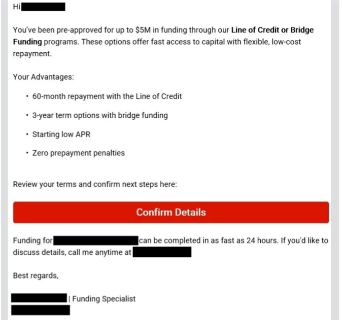
The campaign primarily used financial lures involving business loans, funding and lines of credit, with hundreds of disposable finance-themed domains used to send the messages. The technique is particularly interesting because the same type of invisible characters has previously been associated with AI prompt-injection attacks. Attackers have now found another use for them which is hiding phishing content from security filters while leaving it perfectly readable to people.
How Can a Word Hide in Plain Sight?
The technique is known as ASCII smuggling. The attackers insert invisible Unicode characters between letters in a word. For example, an email filter may be looking for “funding.” The attacker can instead send something equivalent to “fun + [invisible character] + ding”
To the recipient, it still appears as “funding” but to a security system performing a simple text search, the letters are no longer next to each other. The word it is looking for may effectively no longer exist in the form the filter expects. That small difference can help a malicious email avoid certain detection rules.
Why Are Criminals Doing This?
Traditional email security systems use several methods to identify phishing. They may look for:
- Suspicious words
- Known malicious URLs
- Sender reputation
- Impersonated brands
- Suspicious domains
- Malicious attachments
- Known phishing patterns
Attackers know this, so instead of changing the entire message, they can make small changes designed to interfere with how security systems process the text. Microsoft found that the campaign inserted invisible characters into high-value financial terms, rather than hiding a completely separate secret message. This means a recipient can read: “Apply now for business funding” while the underlying email contains invisible characters that break up words such as “funding.”
What Are These Emails Trying to Do?
The campaign used finance-related themes that can be particularly attractive to small businesses. Examples included:
- Business loans
- Lines of credit
- Advance funding
- Business financing
The messages were sent from numerous disposable domains designed to look related to legitimate financial services. The goal of the phishing campaign is to persuade recipients to interact with the message and ultimately provide information or visit attacker-controlled websites.
Can Email Security Actually Stop It?
Yes, but relying on a single detection method creates unnecessary risk. Microsoft said its Defender protections detected the campaign through multiple layers, including sender and IP reputation, URL analysis, machine-learning-based phishing detection, authentication checks and brand-impersonation detection.
Microsoft reported that more than 99% of the messages were caught by layers that did not depend specifically on detecting the invisible Unicode characters. The technique can help bypass a particular filter, but it does not automatically make an email invisible to modern security systems.
Recommendations
- Check emails carefully: A normal-looking email can still be malicious. Verify the sender and links before clicking.
- Be cautious with unexpected financial offers: Be careful with unsolicited emails about loans, funding, investments, credit or urgent financial assistance.
- Verify before sharing information: Do not provide passwords, banking details, or company documents based on an email request. Visit the organization’s official website directly.
- Report suspicious emails: Report suspicious messages to the security team instead of simply deleting them.
- Normalize email content: Email security tools should detect hidden or invisible characters before filtering email content.
- Use multiple detection methods: Combine sender checks, URL scanning, email authentication, and behavioural analysis to improve phishing detection.
- Train employees: Regularly remind employees to question unexpected financial requests and verify them before taking action.
- Protect high-value users: Apply stronger phishing protection and monitoring to Finance, HR, executives, and other users handling sensitive information.
Conclusion
Attackers are looking for the gap between what a person sees and what a security system processes. The email can look harmless but somewhere underneath the message, the attacker has deliberately changed the way the computer reads it.
Phishing continues to evolve, but the objective remains the same: make the victim trust the message long enough to take the attacker's next step. Verify unexpected requests, avoid suspicious links and report unusual emails.

.jpeg)

.png)


.png)
.png)