
.jpeg)
You receive an email, click a voicemail notification, sign in to Microsoft 365 and your MFA code is approved. Everything looks normal except the attacker is already inside.
A new and widespread phishing campaign is demonstrating why simply having Multi-Factor Authentication (MFA) enabled is no longer enough on its own. An active campaign targeting Microsoft 365 users across healthcare, education, manufacturing, government and professional services organizations.
The attackers are not simply trying to steal passwords. They are stealing something potentially more valuable: your authenticated session. And once inside, they quietly search for the people and conversations responsible for payroll, invoices, banking, payments, benefits and other financial operations.
The Attack starts with something Ordinary
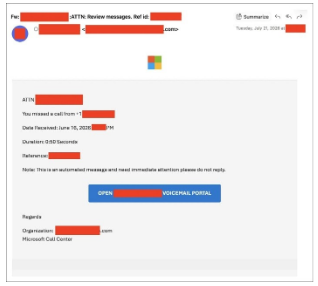
Imagine receiving an email that looks like a routine voicemail notification. It contains Microsoft branding, a familiar-looking reference number and a button asking you to open your organization's voicemail portal.
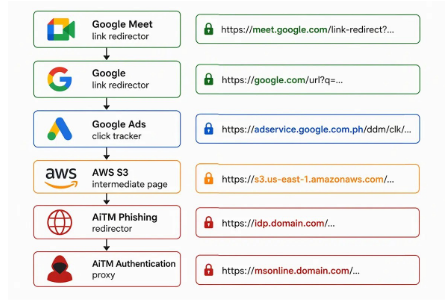
Nothing about it immediately screams "cyberattack” but clicking the link begins a carefully designed journey. Instead of taking the victim directly to the attacker's website, the campaign sends them through several legitimate services, including Google Meet, Google advertising infrastructure and Amazon Web Services (AWS) S3, before eventually reaching the attacker's phishing infrastructure because legitimate services are trusted.
What Happens After You Click?
This is where the campaign becomes particularly dangerous. The victim eventually reaches a fake Microsoft sign-in page but unlike an ordinary fake login page that simply collects your username and password, this one acts as a middleman between you and Microsoft. This technique is called Adversary-in-the-Middle (AiTM) phishing.
What is AiTM?
Let’s say you are making a phone call to your bank, and you believe you're speaking directly to the bank, but an attacker secretly places themselves between you and the bank. They relay the conversation in real time.
You still speak to the real bank, you provide the correct information, but the attacker is listening and capturing what they need. That is what happens during an AiTM attack.
The attacker-controlled website forwards the legitimate Microsoft authentication process to the victim. When the victim enters their password and completes MFA, the attacker can capture the resulting session token.
The Attackers Aren't Looking for Everyone
Once they gain access, the attackers appear to become selective. Instead of immediately changing passwords, sending spam or making obvious changes to the account, they quietly investigate the organization's Microsoft 365 environment using Microsoft's Graph API to identify users associated with:
- Payroll
- Human Resources
- Finance
- Administration
They then searched mailboxes for information involving:
- Payroll
- Invoices
- Payments
- Banking
- Employee benefits
- Financial documents
This is important because the attackers may not need to steal money immediately. They need to learn how the organization moves money so they can identify who handles payroll, who approves payments, which employees communicate with finance teams and where sensitive financial information is stored.
That information can potentially be used to support later financial fraud, including payroll diversion or Business Email Compromise (BEC).
Recommendations
- Use stronger MFA: Organizations should use stronger login protection, such as FIDO2 (Fast Identity Online 2) security keys or passkeys, especially for administrators, finance staff, executives and other important accounts.
- Investigate unusual login activity: Security teams should investigate situations where Microsoft Outlook is shown as the application being used, but the browser information shows Firefox or Python.
- Monitor Microsoft 365 activity: Where the required Microsoft 365 logging is available, security teams should monitor for unusual sign-ins, unusual locations, and suspicious email or Microsoft Graph activity.
- Protect finance and payroll accounts: Finance and payroll users should have stronger security and additional monitoring. Any changes to bank or payment details should be independently verified before being approved.
- Educate users: Organizations should educate employees about the risks associated with unexpected voicemail links and advise them to verify voicemail notifications before clicking any links.
- Take immediate action if an account is compromised: Security teams should log the user out of active sessions, revoke access tokens, reset the password, and set up MFA again if necessary. They should also check the account for any unauthorized activity or changes.
- Check what information was exposed: Organizations should determine what information the attacker may have accessed and take the necessary steps to protect the affected accounts and systems.
Conclusion
Today's attackers can build an entire experience around the victimising legitimate services, realistic authentication pages, location information and stolen sessions to make an attack look like normal activity. And this campaign demonstrates something every organization should remember:
MFA can protect your password, but you also need to protect the session that comes after authentication.
Follow esentry for emerging threat intelligence, cybersecurity advisories and actionable insights designed to help organizations identify suspicious activity before it becomes a costly incident.

.jpeg)
.jpeg)

.png)


.png)
.png)