

There’s an old proverb which says “If walls could talk, they’d tell secrets”, but in 2026, they don’t have to cause your browser already might.
A fresh security investigation has uncovered 287 Chrome extensions quietly transmitting browsing data to remote servers, affecting an estimated 37.4 million installations worldwide which makes roughly 1% of all Chrome users.
In internet terms, that’s not a rounding error. That’s a stadium full of people times several hundred.
And here’s the unsettling part: many of these extensions didn’t look suspicious at all. They promised convenience themes; tab managers, document tools, productivity helpers. Digital assistants, some behaved less like assistants and more like stenographers.
How The Eavesdroppers Were Caught
Instead of trusting labels, permissions, or marketing descriptions, a simple question was raised:
What does the extension actually send over the network?
To answer it, it ran chrome inside a Docker container, intercepted all traffic through a man-in-the-middle proxy, and visited specially crafted “bait” web addresses designed to expose data leaks.
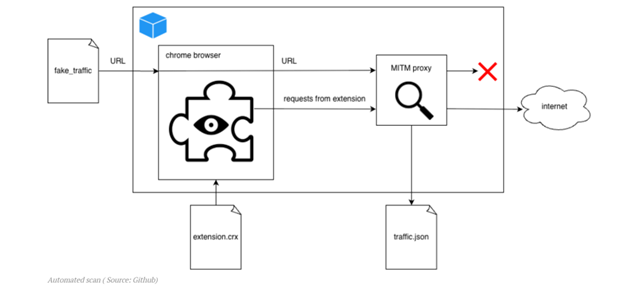
Think of it like dusting for fingerprints, except the fingerprints were packets of data leaving the browser.
The Scale of the Operation
This wasn’t a casual scan.
- 930 CPU-days of computing power
- ~10 minutes testing per extension
- Results published publicly for verification
The alleged recipients ranged from recognizable analytics ecosystems to obscure brokers:
Groups and brands such as Similar web, “Big Star Labs” (described as appearing linked to Similar web), Curly Doggo, Offidocs and other actors described as Chinese, alongside multiple minor brokers.
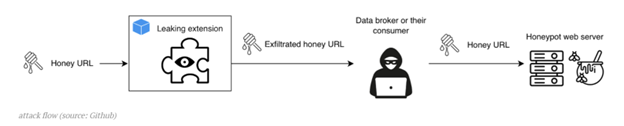
To test whether anyone actually used the stolen data, honey URLs were deployed
Several networks later attempted to access those addresses, including infrastructure associated with:
- Kontera (AWS endpoints)
- HashDit
- Blocksi AI Web Filter
Which suggests some collected browsing data may not just be stored, but queried, enriched, or resold, highlighting the threat that your browsing history may be feeding a market you never knew existed.
What Users Should Do Now
For individuals:
- Remove extensions you don’t recognize or no longer use
- Prefer reputable publishers with clear privacy policies
- Review permissions, especially “Read and change all your data on websites you visit”
- Watch for slowdowns after installing extensions
For organizations:
- Restrict extension installations via policy
- Allowlist only vetted add-ons
- Monitor unusual outbound traffic
Remember extensions can steal habits, and habits predict everything!!!


.jpeg)
.jpeg)

.png)


.png)
.png)